
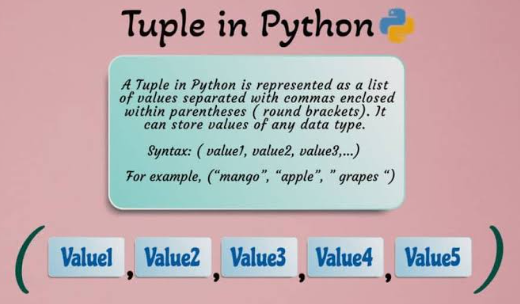
Tuples are one of Python’s built-in data structures for storing multiple values in a single variable. They look similar to lists and can contain many of the same types of data, but there is one important difference: tuples are immutable.
This means that after a tuple has been created, its items cannot normally be added, removed, or changed.
For beginners, understanding tuples is useful because they appear frequently in Python programs, especially when working with fixed collections of values. In this guide, Python Tuples Explained means learning how to create tuples, access their items, use common tuple operations, and understand when a tuple may be more appropriate than a list.
What Is a Python Tuple?
A tuple is an ordered collection of values.
You can create one using parentheses:
fruits = ("apple", "banana", "orange")To display the tuple:
print(fruits)Output:
('apple', 'banana', 'orange')Like lists, tuples maintain the order of their items.
However, unlike lists, tuples cannot normally be modified after creation.
Creating a Tuple
A tuple can contain strings:
colors = ("red", "green", "blue")It can contain numbers:
numbers = (10, 20, 30, 40)It can also contain different data types:
data = ("Alice", 25, True, 8.5)An empty tuple can be created with:
empty_tuple = ()Python also allows you to create tuples without parentheses:
coordinates = 10, 20However, using parentheses often makes the code easier to read.
Creating a Tuple With One Item
A common beginner mistake happens when creating a tuple containing only one value.
This does not create a tuple:
fruit = ("apple")Python treats "apple" as a string.
To create a one-item tuple, add a comma:
fruit = ("apple",)You can check the type:
print(type(fruit))The result shows that it is a tuple.
The comma, rather than the parentheses alone, is what makes it a one-item tuple.
Accessing Tuple Items
Tuple items use indexes just like list items.
Python indexing begins at 0.
Consider:
fruits = ("apple", "banana", "orange")The indexes are:
apple   = 0
banana  = 1
orange  = 2
To access the first item:
print(fruits[0])Output:
appleTo access the second item:
print(fruits[1])Output:
bananaIndexing allows you to work with individual values stored inside a tuple.
Using Negative Indexing
Negative indexes allow you to count backward from the end.
Example:
fruits = ("apple", "banana", "orange")

print(fruits[-1])
Output:
orangeUsing:
print(fruits[-2])returns:
bananaThis is useful when you need the final item without knowing the exact length of the tuple.
Slicing a Tuple
Tuples support slicing.
Consider:
numbers = (10, 20, 30, 40, 50)To get items from index 1 through index 3:
print(numbers[1:4])Output:
(20, 30, 40)The starting index is included, but the ending index is excluded.
You can also write:
print(numbers[:3])Output:
(10, 20, 30)Or:
print(numbers[2:])Output:
(30, 40, 50)Slicing does not change the original tuple. It creates another tuple containing the selected items.
Why Are Tuples Immutable?
The defining feature of tuples is immutability.
Consider:
fruits = ("apple", "banana", "orange")This will not work:
fruits[1] = "mango"Python will raise an error because tuple items cannot be reassigned.
This behavior is useful when a collection represents information that should remain fixed.
For example:
coordinates = (40.7128, -74.0060)If these values represent one specific geographic coordinate, keeping them together in an immutable structure can make sense.
Tuple vs List
Tuples and lists have many similarities.
A list uses square brackets:
fruits = ["apple", "banana", "orange"]A tuple usually uses parentheses:
fruits = ("apple", "banana", "orange")The key difference is that lists are mutable while tuples are immutable.
With a list, you can:
fruits.append("mango")
fruits.remove("apple")
fruits[0] = "pear"
You cannot directly perform these modifications on a tuple.
Use a list when the collection is expected to change.
Use a tuple when the values should generally remain fixed.
Finding the Length of a Tuple
The len() function returns the number of items in a tuple.
Example:
fruits = ("apple", "banana", "orange")

print(len(fruits))
Output:
3This works exactly as it does with Python lists.
Checking Whether an Item Exists
The in operator can check whether a value appears in a tuple.
Example:
fruits = ("apple", "banana", "orange")

if "banana" in fruits:
    print("Banana is in the tuple.")
Output:
Banana is in the tuple.You can also use not in:
if "mango" not in fruits:
    print("Mango is not in the tuple.")
This is useful when validating or searching collections of fixed values.
Looping Through a Tuple
Tuples work naturally with for loops.
Example:
colors = ("red", "green", "blue")

for color in colors:
    print(color)
Output:
red
green
blue
The loop processes every item one at a time.
You can also use indexes:
for i in range(len(colors)):
    print(colors[i])
However, directly looping through the values is usually simpler when you do not need the index.
The count() Method
Tuples have fewer methods than lists because they cannot be modified.
One available method is count().
It tells you how many times a value appears.
Example:
numbers = (1, 2, 2, 3, 2, 4)

print(numbers.count(2))
Output:
3The value 2 appears three times.
The index() Method
The index() method finds the position of a value.
Example:
fruits = ("apple", "banana", "orange")

print(fruits.index("banana"))
Output:
1Remember that Python begins counting indexes from zero.
If the value does not exist in the tuple, Python raises an error.
Tuple Packing
Python allows several values to be grouped into a tuple automatically.
This is called tuple packing.
Example:
person = "Alice", 25, "London"

print(person)
Output:
('Alice', 25, 'London')Three separate values have been packed into one tuple.
Tuple packing is common in Python because functions can use tuples to work with several related values.
Tuple Unpacking
Tuple unpacking does the opposite.
Consider:
person = ("Alice", 25, "London")You can assign each value to a separate variable:
name, age, city = personNow:
print(name)
print(age)
print(city)
Output:
Alice
25
London
The number of variables normally needs to match the number of tuple values.
Tuple unpacking is a convenient Python feature and appears frequently in real programs.
Using the Asterisk When Unpacking
Python also supports extended unpacking using *.
Example:
numbers = (1, 2, 3, 4, 5)

first, *middle, last = numbers
Now:
print(first)
print(middle)
print(last)
Output:
1
[2, 3, 4]
5
The variable middle collects the remaining values.
Notice that the collected values are stored in a list.
Combining Tuples
You can combine tuples with the + operator.
Example:
tuple1 = ("apple", "banana")
tuple2 = ("orange", "mango")

fruits = tuple1 + tuple2

print(fruits)
Output:
('apple', 'banana', 'orange', 'mango')This creates a new tuple rather than modifying the original ones.
Repeating Tuples
The multiplication operator can repeat tuple contents.
Example:
numbers = (1, 2)

result = numbers * 3

print(result)
Output:
(1, 2, 1, 2, 1, 2)Again, Python creates a new tuple.
Converting a List to a Tuple
You can convert a list into a tuple using tuple().
Example:
fruits_list = ["apple", "banana", "orange"]

fruits_tuple = tuple(fruits_list)

print(fruits_tuple)
Output:
('apple', 'banana', 'orange')This can be useful when data has finished changing and you want to treat it as a fixed collection.
Converting a Tuple to a List
You can also convert a tuple into a list:
fruits = ("apple", "banana", "orange")

fruits_list = list(fruits)
Now you can modify it:
fruits_list.append("mango")If necessary, convert it back:
fruits = tuple(fruits_list)This provides a workaround when tuple values genuinely need to be changed.
Tuples Can Contain Mutable Objects
Tuples themselves are immutable, but they can contain mutable objects.
For example:
data = ("Alice", [90, 85, 95])You cannot replace the list directly:
data[1] = [100, 100]But you can modify the list inside the tuple:
data[1].append(100)This works because the tuple still refers to the same list object; only the contents of that list changed.
This distinction becomes useful as you learn more about Python objects and mutability.
Using Tuples With Functions
Functions commonly return multiple values as a tuple.
Example:
def calculate(a, b):
    return a + b, a - b
Then:
result = calculate(10, 4)

print(result)
Output:
(14, 6)You can also unpack the result immediately:
total, difference = calculate(10, 4)This makes tuples especially useful for returning several related values from one function.
Common Beginner Mistakes
One common mistake is trying to modify a tuple:
colors = ("red", "green", "blue")

colors[0] = "yellow"
This causes an error because tuples are immutable.
Another mistake is forgetting the comma in a one-item tuple:
number = (10)This is an integer, not a tuple.
The correct version is:
number = (10,)Beginners may also assume that tuples can use methods such as append() or remove().
They cannot.
Those methods belong to mutable structures such as lists.
When Should You Use a Tuple?
Tuples are useful when related values belong together and should not normally change.
Common examples include:
rgb_color = (255, 128, 0)

coordinates = (51.5074, -0.1278)

screen_size = (1920, 1080)
They can also be useful when returning several values from functions or storing fixed records.
Lists remain better when items need to be frequently added, removed, reordered, or replaced.
Understanding Python Tuples
When learning Python Tuples Explained, the most important concept is immutability.
Tuples are ordered collections similar to lists, but their structure cannot normally be changed after creation. You can access values through indexes, slice them, loop through them, search them, combine tuples, and unpack their contents into separate variables.
For beginners, it is helpful to think of lists as collections designed to change and tuples as collections intended to stay relatively fixed.
Once you understand indexing, slicing, packing, unpacking, and the difference between mutable and immutable data, tuples become a simple but valuable part of your Python programming toolkit.