
Python Functions for Beginners
下面是一篇约 1000 词的英文文章,围绕关键词 “Python Functions for Beginners” 展开,适合 Python 教程、编程入门或技术类网站发布。
Python Functions for Beginners: A Simple Guide With Examples
Functions are one of the most important concepts in Python programming. They allow you to organize code into reusable blocks, reduce repetition, and make programs easier to understand and maintain.
Learning Python Functions for Beginners is an essential step after becoming familiar with variables, conditions, and loops. Instead of writing the same instructions again and again, you can place those instructions inside a function and call the function whenever you need it.
Functions are used in almost every real Python project, from simple calculators to websites, data analysis programs, automation scripts, and machine learning applications.
What Is a Function in Python?
A function is a reusable block of code designed to perform a specific task.
For example:
def greet():
    print("Hello!")
This creates a function named greet.
However, defining the function does not run it automatically.
To execute the function, you need to call it:
greet()The output is:
Hello!The function can be called as many times as needed:
greet()
greet()
greet()
Output:
Hello!
Hello!
Hello!
This is one of the main advantages of functions: you can reuse the same code without rewriting it.
How to Define a Python Function
Python functions are created using the def keyword.
The basic syntax is:
def function_name():
    code
For example:
def say_goodbye():
    print("Goodbye!")
The function name should describe what the function does.
Good names include:
calculate_total()
print_message()
check_age()
get_username()
Clear function names make your code easier to read.
Function names generally follow the same naming rules as variables. They cannot contain spaces and usually use lowercase letters with underscores between words.
Calling a Function
After defining a function, you call it by writing its name followed by parentheses.
Example:
def welcome():
    print("Welcome to Python!")

welcome()
The result is:
Welcome to Python!You can call a function from different parts of your program whenever the same task needs to be performed.
Using Parameters in Functions
Functions become more useful when they can accept information.
A parameter is a variable listed inside the function definition.
For example:
def greet(name):
    print("Hello", name)
Now the function expects a value for name.
You can call it like this:
greet("Anna")
greet("David")
Output:
Hello Anna
Hello David
The same function can produce different results depending on the value passed to it.
Parameters vs Arguments
Beginners often confuse parameters and arguments.
A parameter appears in the function definition:
def greet(name):Here, name is a parameter.
An argument is the actual value passed into the function:
greet("Alice")Here, "Alice" is the argument.
The distinction is simple:
A parameter is the placeholder.
An argument is the actual value.
Functions With Multiple Parameters
A function can accept more than one parameter.
Example:
def add_numbers(a, b):
    print(a + b)
Call the function:
add_numbers(5, 3)Output:
8Another example:
def introduce(name, age):
    print("My name is", name)
    print("I am", age, "years old")
Call it with:
introduce("Emma", 25)Functions with multiple parameters are useful when a calculation or task depends on several pieces of information.
Returning Values From Functions
Functions can return values using the return keyword.
Example:
def add_numbers(a, b):
    return a + b
Now you can save the result:
result = add_numbers(10, 5)

print(result)
Output:
15This is different from using print() inside the function.
A returned value can be stored, reused, or passed into another function.
For example:
total = add_numbers(20, 30)
final_total = total * 2

print(final_total)
Output:
100Using return makes functions much more flexible.
Print vs Return
One common beginner question is the difference between print() and return.
Consider:
def add_numbers(a, b):
    print(a + b)
This displays the result.
But:
def add_numbers(a, b):
    return a + b
returns the value to the rest of the program.
If you need to use the result later, return is usually the better choice.
For example:
result = add_numbers(4, 6)
print(result)
This allows the returned value to be stored and reused.
Default Parameter Values
Python allows you to give parameters default values.
Example:
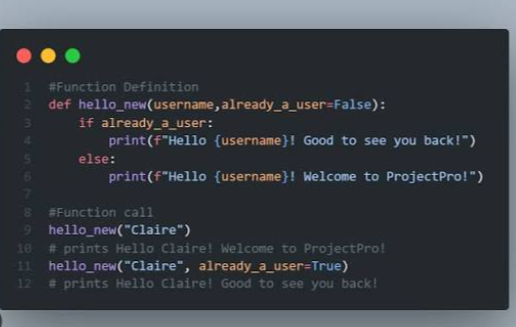
def greet(name="Guest"):
    print("Hello", name)
If you call:
greet()the output is:
Hello GuestBut if you provide an argument:
greet("Michael")the output becomes:
Hello MichaelDefault parameters are useful when a function should work even if certain information is not provided.
Keyword Arguments
You can also pass arguments by parameter name.
Example:
def describe_pet(name, animal):
    print(name, "is a", animal)
You can call it like this:
describe_pet(animal="cat", name="Luna")Even though the order is different, Python knows which value belongs to each parameter.
Keyword arguments can make function calls easier to understand, especially when functions accept several arguments.
Functions With If Statements
Functions can contain conditional logic.
Example:
def check_age(age):
    if age >= 18:
        return "Adult"
    else:
        return "Minor"
Call the function:
print(check_age(21))Output:
AdultThis shows how functions and if statements can work together.
Functions With Loops
Functions can also contain loops.
Example:
def print_numbers():
    for number in range(1, 6):
        print(number)
Call the function:
print_numbers()Output:
1
2
3
4
5
You can also pass a list into a function:
def show_items(items):
    for item in items:
        print(item)
Then:
fruits = ["apple", "banana", "orange"]

show_items(fruits)
This is useful when working with collections of data.
Local Variables
Variables created inside a function are usually local to that function.
Example:
def calculate():
    total = 10 + 20
    print(total)
The variable total exists inside the function.
Trying to use it outside the function may produce an error:
print(total)This happens because local variables belong only to the function where they were created.
Understanding variable scope becomes increasingly important as programs grow larger.
Global Variables
A variable created outside a function is generally called a global variable.
Example:
message = "Hello"

def show_message():
    print(message)

show_message()
The function can read the global variable.
However, beginners should avoid depending too heavily on global variables.
Passing values into functions through parameters and returning results is usually clearer and easier to maintain.
Returning Multiple Values
Python functions can return more than one value.
Example:
def calculate(a, b):
    total = a + b
    difference = a - b

    return total, difference
You can store both returned values:
result1, result2 = calculate(10, 4)

print(result1)
print(result2)
Output:
14
6
This feature is useful when one function performs several related calculations.
Creating a Simple Calculator Function
A calculator is a useful beginner exercise.
Example:
def calculate(a, b, operation):
    if operation == "add":
        return a + b
    elif operation == "subtract":
        return a - b
    elif operation == "multiply":
        return a * b
    elif operation == "divide":
        return a / b
You can call it like this:
result = calculate(10, 5, "multiply")

print(result)
Output:
50This example combines functions, parameters, conditions, and return values.
Why Functions Are Useful
Functions provide several important advantages.
They reduce repetition.
Instead of writing the same code repeatedly:
print("Welcome!")
print("Welcome!")
print("Welcome!")
you can create:
def welcome():
    print("Welcome!")
and call it whenever needed.
Functions also make large programs easier to organize.
For example, a shopping application might contain separate functions such as:
calculate_price()
apply_discount()
check_inventory()
process_payment()
Each function handles one specific task.
This makes the program easier to understand and debug.
Keep Functions Focused
A good function usually performs one clear task.
Instead of creating one huge function that handles an entire program, divide the program into smaller functions.
For example, instead of:
process_everything()you might create:
get_user_input()
calculate_total()
apply_discount()
display_result()
Smaller functions are easier to test, modify, and reuse.
Using Docstrings
A docstring explains what a function does.
Example:
def add_numbers(a, b):
    """Return the sum of two numbers."""
    return a + b
The text inside triple quotes is the docstring.
Docstrings become especially useful when functions are shared with other programmers or used in larger projects.
They can explain:
- What the function does
- What parameters it expects
- What value it returns
Common Beginner Mistakes
One common mistake is defining a function but forgetting to call it.
For example:
def greet():
    print("Hello")
Nothing is displayed until you write:
greet()Another common mistake is providing the wrong number of arguments.
If the function is:
def add(a, b):
    return a + b
this call is incorrect:
add(5)Python expects two arguments.
Another mistake is forgetting to return a value:
def add(a, b):
    a + b
This calculation occurs, but the result is not returned.
The correct version is:
def add(a, b):
    return a + b
Practice With Simple Function Projects
The best way to understand Python Functions for Beginners is to build small programs.
Good practice projects include:
- Temperature converter
- Grade calculator
- Discount calculator
- Age checker
- Tip calculator
- BMI calculator
- Password checker
- Simple calculator
- Shopping total calculator
- Unit converter
For example:
def celsius_to_fahrenheit(celsius):
    return (celsius * 9 / 5) + 32

temperature = celsius_to_fahrenheit(20)

print(temperature)
Output:
68.0This function accepts a value, performs a calculation, and returns the result.
Build Better Python Programs With Functions
Understanding Python Functions for Beginners helps you move from simple scripts toward organized programs.
Functions allow you to group related instructions, reuse code, accept input through parameters, and produce results with return. They can also contain conditions, loops, calculations, and calls to other functions.
Start with simple functions that print messages or perform calculations. Then practice adding parameters, return values, default arguments, and conditional logic.
As your Python programs become larger, functions will become one of your most important tools for keeping code clean, reusable, and easy to understand.