
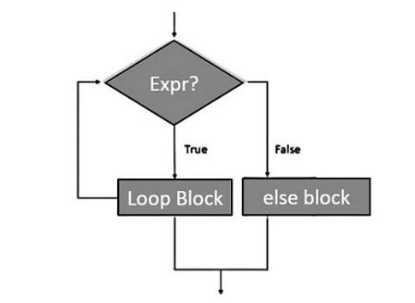
Loops are an essential part of programming because they allow a program to repeat actions without writing the same code again and again. In Python, one of the most useful loop structures is the while loop.
Understanding Python While Loops Explained is especially important for beginners because while loops are useful when you do not know in advance how many times an action needs to repeat. Instead of running for a fixed number of iterations, a while loop continues as long as a condition remains true.
This makes it useful for user input, counters, games, validation, menus, and many other programming tasks.
What Is a While Loop in Python?
A while loop repeatedly executes a block of code while a specified condition is True.
For example:
count = 1

while count <= 5:
    print(count)
    count += 1
The output is:
1
2
3
4
5
Python checks the condition:
count <= 5If the condition is true, the code inside the loop runs.
After each iteration, count increases by 1. When count becomes 6, the condition becomes false and the loop stops.
Basic Python While Loop Syntax
The basic structure of a while loop is:
while condition:
    statement
For example:
number = 0

while number < 3:
    print(number)
    number += 1
The output is:
0
1
2
The colon after the condition is required, and the code inside the loop must be indented.
Python uses indentation to determine which statements belong to the loop.
How a While Loop Works
A while loop follows a simple process.
First, Python evaluates the condition.
If it is true, the loop body runs.
After the loop body finishes, Python checks the condition again.
This continues until the condition becomes false.
For example:
x = 1

while x < 4:
    print("Hello")
    x += 1
Python prints:
Hello
Hello
Hello
After the third iteration, x becomes 4, so:
x < 4is false.
The loop then ends.
Using a Counter in a While Loop
Counters are commonly used with while loops.
Example:
count = 10

while count > 0:
    print(count)
    count -= 1
This creates a countdown from 10 to 1.
You can add another statement after the loop:
count = 5

while count > 0:
    print(count)
    count -= 1

print("Finished!")
Output:
5
4
3
2
1
Finished!
Counters are useful in timers, games, repeated calculations, and basic automation.
Avoiding Infinite While Loops
One of the most important concepts when learning Python While Loops Explained is avoiding infinite loops.
An infinite loop happens when the condition never becomes false.
For example:
number = 1

while number <= 5:
    print(number)
This loop never changes the value of number.
Because number always remains 1, the condition always stays true.
The program continues indefinitely.
The correct version is:
number = 1

while number <= 5:
    print(number)
    number += 1
Always make sure something inside the loop can eventually change the condition.
Using While Loops With User Input
One of the most practical uses of while loops is repeatedly asking for user input.
For example:
password = ""

while password != "python123":
    password = input("Enter the password: ")

print("Access granted.")
The program continues asking for the password until the correct value is entered.
This type of structure can be used for login systems, menu choices, quizzes, and form validation.
Validating User Input
A while loop can prevent a program from continuing until the user enters acceptable data.
For example:
age = -1

while age < 0:
    age = int(input("Enter your age: "))

print("Your age is", age)
If the user enters a negative number, the program asks again.
Once a valid value is entered, the loop stops.
This makes while loops particularly useful for input validation.
Using break in a While Loop
The break statement stops a loop immediately.
Example:
number = 1

while number <= 10:
    if number == 5:
        break

    print(number)
    number += 1
Output:
1
2
3
4
When number becomes 5, Python executes break, and the loop ends.
This is useful when you want to stop based on a condition that is different from the main while condition.
Using continue in a While Loop
The continue statement skips the rest of the current iteration and starts the next one.
Example:
number = 0

while number < 5:
    number += 1

    if number == 3:
        continue

    print(number)
Output:
1
2
4
5
When number equals 3, Python skips the print() statement and moves to the next iteration.
Be careful when using continue because the loop variable still needs to change correctly.
Otherwise, you may accidentally create an infinite loop.
Using else With a While Loop
Python allows an else block after a while loop.
Example:
count = 1

while count <= 3:
    print(count)
    count += 1
else:
    print("Loop completed.")
Output:
1
2
3
Loop completed.
The else block runs when the loop condition becomes false naturally.
However, if the loop ends with break, the else block does not run.
Example:
count = 1

while count <= 5:
    if count == 3:
        break

    print(count)
    count += 1
else:
    print("Loop completed.")
In this example, the else block is skipped.
While Loop vs For Loop
Beginners often wonder when to use a while loop instead of a for loop.
A for loop is usually better when you know how many times you want to repeat an action or when you are processing a collection.
For example:
for number in range(5):
    print(number)
A while loop is usually better when the number of repetitions depends on a changing condition.
For example:
password = ""

while password != "secret":
    password = input("Password: ")
You do not know how many attempts the user will need, so a while loop makes sense.
Creating a Simple Menu With a While Loop
A common beginner project is an interactive menu.
Example:
choice = ""

while choice != "3":
    print("1. Start")
    print("2. Help")
    print("3. Exit")

    choice = input("Choose an option: ")

    if choice == "1":
        print("Starting program...")
    elif choice == "2":
        print("Help menu")
    elif choice == "3":
        print("Goodbye!")
The program continues displaying the menu until the user chooses option 3.
This type of loop is common in command-line applications.
Using True to Create Controlled Loops
Sometimes programmers deliberately create a loop using:
while True:Because True never changes, the loop continues until something inside it uses break.
For example:
while True:
    command = input("Type 'quit' to exit: ")

    if command == "quit":
        break

    print("You entered:", command)
This structure is useful when the exit condition depends on user input or another event.
However, beginners should use it carefully and always make sure there is a clear way to exit the loop.
Nested While Loops
A while loop can exist inside another while loop.
Example:
row = 1

while row <= 3:
    column = 1

    while column <= 2:
        print(row, column)
        column += 1

    row += 1
The inner loop runs completely for each iteration of the outer loop.
Nested loops can be useful for grids, tables, patterns, and multidimensional data.
However, too many nested loops can make code harder to read.
Using While Loops for a Number Guessing Game
A simple guessing game is a good way to practice.
secret_number = 7
guess = 0

while guess != secret_number:
    guess = int(input("Guess the number: "))

    if guess < secret_number:
        print("Too low")
    elif guess > secret_number:
        print("Too high")

print("Correct!")
The program keeps running until the user guesses the correct number.
This example combines:
whileifelif- user input
- comparison operators
It demonstrates how several basic Python concepts can work together.
Common While Loop Mistakes
One common mistake is forgetting to update the loop variable.
Incorrect:
count = 1

while count <= 5:
    print(count)
Correct:
count = 1

while count <= 5:
    print(count)
    count += 1
Another mistake is using the wrong condition.
For example:
count = 1

while count >= 5:
    print(count)
Because 1 >= 5 is false from the beginning, the loop never runs.
Beginners should always check both the starting value and the condition.
Be Careful With Logical Conditions
While loops can use logical operators such as and, or, and not.
Example:
age = 25
attempts = 0

while age >= 18 and attempts < 3:
    print("Checking...")
    attempts += 1
Both conditions must remain true for the loop to continue.
Logical operators can make loops more powerful, but complex conditions can also make them harder to understand.
Using parentheses can sometimes improve readability.
Practice With Simple While Loop Projects
The best way to understand while loops is through practice.
Beginner projects include:
- Countdown timer
- Password checker
- Number guessing game
- Menu system
- Quiz program
- Input validator
- Savings calculator
- Simple calculator
- Repeated shopping list input
- Game score tracker
For example, a simple savings calculator might look like this:
savings = 0

while savings < 100:
    savings += 20
    print("Current savings:", savings)

print("Savings goal reached!")
This program keeps adding money until the target is reached.
When Should You Use a While Loop?
Use a while loop when repetition depends on a condition rather than a fixed sequence.
Typical situations include:
- Waiting for valid input
- Repeating until a user chooses to exit
- Running a game until it ends
- Continuing until a target is reached
- Processing data until a condition changes
If you already know exactly how many times the code should repeat, a for loop may be simpler.
Choosing the right type of loop makes your code easier to read and maintain.
Build Better Programs With While Loops
Understanding Python While Loops Explained gives beginners an important tool for creating programs that respond to changing conditions.
A while loop continues running while its condition remains true. Counters can control the number of repetitions, while break and continue provide additional control over loop behavior. Combining while loops with user input and conditional statements makes it possible to build interactive programs.
The most important habit is to make sure every loop has a clear stopping condition.
Once you understand that principle, while loops become useful for everything from simple counters and validation exercises to menus, games, and more advanced Python applications.