
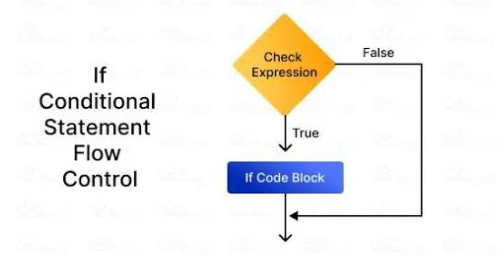
Conditional statements are one of the most important parts of programming. They allow a program to make decisions based on different conditions. In Python, if, elif, and else statements are used to control which blocks of code run depending on whether certain expressions are true or false.
Understanding Python If Else Statements is essential for beginners because conditional logic appears in almost every type of program. From checking passwords and calculating grades to validating user input and controlling game behavior, decision-making is a fundamental programming skill.
What Are Python If Else Statements?
An if statement checks whether a condition is true.
If the condition evaluates to True, Python runs the indented block of code below it.
For example:
age = 20

if age >= 18:
    print("You are an adult.")
The condition is:
age >= 18Because 20 is greater than or equal to 18, the condition is true, so Python prints:
You are an adult.If the condition were false, the code inside the if block would not run.
Basic Python If Statement Syntax
The basic structure of an if statement is:
if condition:
    statement
For example:
temperature = 30

if temperature > 25:
    print("It is warm outside.")
A colon : must appear at the end of the condition.
The following code must also be indented.
Python uses indentation to identify which statements belong to the conditional block.
Incorrect indentation can cause an error.
For example:
if temperature > 25:
print("It is warm outside.")
This is invalid because the print() statement is not indented.
How the Else Statement Works
An else statement provides an alternative when the if condition is false.
Example:
age = 15

if age >= 18:
    print("You are an adult.")
else:
    print("You are under 18.")
Because age >= 18 is false, Python runs the else block.
The result is:
You are under 18.Using if and else together allows a program to choose between two possible outcomes.
Using Elif for Multiple Conditions
Sometimes a program needs to check more than two possibilities.
Python provides the elif keyword, which means “else if.”
For example:
score = 85

if score >= 90:
    print("Grade A")
elif score >= 80:
    print("Grade B")
elif score >= 70:
    print("Grade C")
else:
    print("Grade D")
Python checks each condition from top to bottom.
Since 85 is not greater than or equal to 90, the first condition fails.
The next condition is true:
score >= 80So Python prints:
Grade BAfter a true condition is found, the remaining elif and else blocks are skipped.
Comparison Operators in If Statements
Conditions often use comparison operators.
Common comparison operators include:
==   # Equal to
!=   # Not equal to
>    # Greater than
<    # Less than
>=   # Greater than or equal to
<=   # Less than or equal to
Example:
number = 10

if number == 10:
    print("The number is 10.")
Another example:
price = 50

if price < 100:
    print("The product costs less than $100.")
Comparison operators allow Python to evaluate relationships between values.
Using Logical Operators
Conditions can also contain logical operators.
Python has three main logical operators:
and
or
not
The and operator requires both conditions to be true.
Example:
age = 25
has_ticket = True

if age >= 18 and has_ticket:
    print("Entry allowed.")
The or operator requires only one condition to be true.
day = "Sunday"

if day == "Saturday" or day == "Sunday":
    print("It is the weekend.")
The not operator reverses a Boolean condition.
is_raining = False

if not is_raining:
    print("You do not need an umbrella.")
Logical operators are useful when a decision depends on several factors.
Nested If Statements
An if statement can be placed inside another if statement.
This is called a nested conditional.
For example:
age = 25
has_license = True

if age >= 18:
    if has_license:
        print("You can drive.")
The second condition is only checked if the first condition is true.
Nested statements can be useful, but too many levels can make code difficult to read.
When possible, logical operators can provide a simpler alternative.
For example:
if age >= 18 and has_license:
    print("You can drive.")
This version is shorter and easier to understand.
Checking User Input
One of the most common uses of Python If Else Statements is checking input provided by the user.
Example:
password = input("Enter your password: ")

if password == "python123":
    print("Access granted.")
else:
    print("Incorrect password.")
The program compares the user’s input with the expected password.
A similar structure can be used for usernames, menu choices, quiz answers, and many other forms of input.
Checking Whether a Number Is Positive or Negative
Conditional statements can easily classify numbers.
Example:
number = -5

if number > 0:
    print("Positive number")
elif number < 0:
    print("Negative number")
else:
    print("Zero")
This program handles three possible cases.
The result is:
Negative numberExercises like this are useful for practicing conditional logic.
Checking Odd and Even Numbers
The modulus operator % can be combined with if statements.
Example:
number = 8

if number % 2 == 0:
    print("Even")
else:
    print("Odd")
The expression:
number % 2returns the remainder after division by 2.
If the remainder is zero, the number is even.
Using If Statements With Strings
Conditions can also compare strings.
Example:
color = "blue"

if color == "blue":
    print("You selected blue.")
Be careful because string comparisons are case-sensitive.
For example:
"Blue" == "blue"returns:
FalseYou can use .lower() to make comparisons more flexible.
color = input("Enter a color: ").lower()

if color == "blue":
    print("You selected blue.")
Now "Blue", "BLUE", and "blue" can all be converted to lowercase before comparison.
Using Membership Operators in Conditions
The in operator checks whether a value exists inside a sequence.
Example:
fruits = ["apple", "banana", "orange"]

if "banana" in fruits:
    print("Banana is available.")
You can also use not in.
if "mango" not in fruits:
    print("Mango is not available.")
These conditions are useful when working with lists, strings, tuples, sets, and dictionaries.
Truthy and Falsy Values
Python does not always require explicit comparisons.
Certain values are automatically treated as true or false.
Values commonly considered false include:
False
None
0
0.0
""
[]
{}
For example:
name = ""

if name:
    print("Name entered.")
else:
    print("No name entered.")
Because an empty string is considered false, the else block runs.
This feature can make Python code shorter and more readable.
Using a Short If Else Expression
Python also supports a compact conditional expression, sometimes called a ternary expression.
For example:
age = 20

status = "Adult" if age >= 18 else "Minor"

print(status)
The result is:
AdultThis format is useful for simple conditions.
However, regular if and else statements are usually easier to read when the logic becomes more complicated.
Common Beginner Mistakes
A common mistake is using = instead of ==.
Incorrect:
if age = 18:
    print("Adult")
Correct:
if age == 18:
    print("Age is 18")
The = symbol assigns a value, while == compares two values.
Another mistake is forgetting the colon:
if age >= 18It should be:
if age >= 18:Incorrect indentation is also a frequent source of errors.
Order of Conditions Matters
When using multiple elif conditions, their order can affect the result.
Consider:
score = 95

if score >= 60:
    print("Pass")
elif score >= 90:
    print("Excellent")
This prints:
PassThe first condition is already true, so Python never checks the second one.
A better structure is:
if score >= 90:
    print("Excellent")
elif score >= 60:
    print("Pass")
More specific conditions should generally appear before broader ones.
Practice With Simple Projects
The best way to understand conditional statements is to use them in small programs.
Good beginner projects include:
- Grade calculators
- Age checkers
- Password validation
- Number guessing games
- Discount calculators
- Temperature recommendations
- Simple quizzes
- Login systems
- Shipping cost calculators
- Movie ticket eligibility checkers
For example:
total = 120

if total >= 100:
    discount = 20
else:
    discount = 0

final_price = total - discount

print(final_price)
This simple program applies a discount based on the purchase total.
Build Better Programs With Conditional Logic
Understanding Python If Else Statements allows programs to respond differently to different situations.
The if statement checks a condition, elif handles additional possibilities, and else provides a fallback when no previous condition is true.
By combining conditional statements with comparison operators, logical operators, user input, lists, and variables, you can create programs that make useful decisions.
Start with simple conditions before moving to nested logic and more complex expressions. With practice, if, elif, and else will become some of the most frequently used tools in your Python programming.