
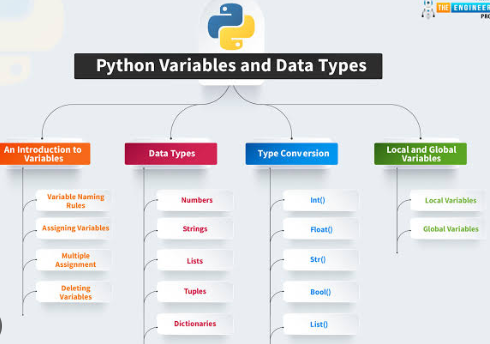
Python Variables and Data Types: A Beginner’s Guide
Understanding Python Variables and Data Types is one of the first steps in learning how to program with Python. Variables allow you to store information, while data types tell Python what kind of information is being stored.
These two concepts appear in almost every Python program. Whether you are building a calculator, analyzing data, creating a website, or writing an automation script, you will constantly work with variables and different types of values.
Fortunately, Python makes both concepts relatively easy to understand because you do not need to declare variable types in advance.
What Is a Variable in Python?
A variable is a name that refers to a value stored in memory.
For example:
name = "Emma"
age = 25
In this code, name is a variable containing the text "Emma", while age contains the number 25.
You can display these values using:
print(name)
print(age)
The output will be:
Emma
25
Variables allow you to reuse and modify information throughout a program.
Instead of typing the same value repeatedly, you can store it once and refer to it by name.
How to Create Variables
Python variables are created using the assignment operator =.
For example:
city = "London"
temperature = 18
price = 29.99
The variable name appears on the left side, while the value appears on the right.
Python automatically determines what type of value is being assigned.
You can also assign multiple variables:
name = "Alex"
age = 30
country = "Canada"
Variables can be changed later:
score = 10
score = 25
After the second assignment, score contains 25.
This ability to update values is one reason variables are so useful.
Python Variable Naming Rules
Variable names must follow certain rules.
They can contain letters, numbers, and underscores.
Valid examples include:
user_name = "John"
age2 = 40
total_price = 100
A variable cannot begin with a number:
2name = "John"This is invalid.
Spaces are also not allowed:
user name = "John"Instead, use an underscore:
user_name = "John"Variable names are case-sensitive.
This means:
name
Name
NAME
are treated as three different variables.
Clear and descriptive names make code easier to read.
What Are Data Types in Python?
A data type describes the kind of value stored in a variable.
For example, text, whole numbers, decimal numbers, and true-or-false values are different types of data.
Some of the most common Python data types include:
strintfloatboollisttupledictset
Understanding these types is essential because different data types behave differently when used in calculations, comparisons, and functions.
Strings in Python
A string stores text.
Strings are written inside quotation marks:
name = "Emma"
city = 'Paris'
Both single and double quotes are valid.
You can combine strings using the + operator:
first_name = "John"
last_name = "Smith"

full_name = first_name + " " + last_name
print(full_name)
The result is:
John SmithYou can also use f-strings:
name = "Emma"
age = 25

print(f"{name} is {age} years old.")
Strings are one of the most commonly used data types in Python.
Integers in Python
Integers are whole numbers without decimal points.
Examples include:
age = 25
year = 2026
score = -5
Integers can be positive, negative, or zero.
You can perform arithmetic with them:
a = 10
b = 4

print(a + b)
print(a - b)
print(a * b)
Integers are commonly used for counting, indexing, ages, quantities, and many other numerical tasks.
Floating-Point Numbers
Floats represent numbers with decimal points.
Examples include:
price = 19.99
height = 1.75
temperature = 23.5
You can use floats in calculations:
price = 12.50
quantity = 3

total = price * quantity
print(total)
Floats are useful for measurements, prices, percentages, and other values that require decimal precision.
Boolean Values
A Boolean represents one of two values:
True
False
For example:
is_logged_in = True
is_admin = False
Booleans are commonly used in conditions.
Example:
is_logged_in = True

if is_logged_in:
    print("Welcome!")
Comparison expressions also produce Boolean values:
age = 20

print(age >= 18)
The output is:
TrueBooleans are essential for controlling program logic.
Lists in Python
A list stores multiple values in one variable.
Example:
fruits = ["apple", "banana", "orange"]You can access an item using its index:
print(fruits[0])The result is:
applePython indexing starts at zero.
You can add items:
fruits.append("mango")You can also change items:
fruits[1] = "grape"Lists are flexible and can store different types of data.
Tuples in Python
Tuples are similar to lists, but they cannot be changed after they are created.
A tuple uses parentheses:
coordinates = (10, 20)You can access items by index:
print(coordinates[0])Tuples are useful when you want to store a collection of values that should remain fixed.
For example, coordinates or configuration values may be stored in tuples.
Dictionaries in Python
A dictionary stores data as key-value pairs.
Example:
person = {
    "name": "Alex",
    "age": 30,
    "city": "Boston"
}
You can access a value using its key:
print(person["name"])The result is:
AlexYou can update values:
person["age"] = 31Dictionaries are extremely useful when storing related information with descriptive labels.
Sets in Python
A set stores unique values.
Example:
numbers = {1, 2, 3, 4}If you try to add a duplicate value, it will not appear twice.
For example:
numbers = {1, 2, 2, 3}
print(numbers)
The duplicate 2 is removed.
Sets are useful when you need to eliminate duplicates or compare groups of values.
How to Check a Data Type
Python provides the type() function to check a value’s data type.
Example:
name = "Emma"
age = 25
price = 19.99

print(type(name))
print(type(age))
print(type(price))
The output will show:
<class 'str'>
<class 'int'>
<class 'float'>
This can be useful when debugging or learning how values behave.
Converting Between Data Types
Python allows you to convert one type of data into another.
For example:
age = "25"
age_number = int(age)
The original value is a string, while the converted value is an integer.
Other common conversion functions include:
int()
float()
str()
bool()
Example:
price = 10
price_text = str(price)
Type conversion is especially important when working with user input.
User Input and Data Types
The input() function always returns text.
For example:
age = input("Enter your age: ")Even if the user enters 25, Python treats it as a string.
If you want to perform calculations, convert it first:
age = int(input("Enter your age: "))

print(age + 1)
If the user enters 25, the program prints:
26Understanding this behavior prevents many common beginner errors.
Common Type Errors
Many Python errors happen because incompatible data types are used together.
For example:
age = "25"
print(age + 5)
This causes an error because Python cannot directly add a string and an integer.
The correct version is:
age = int("25")
print(age + 5)
Another common mistake is accidentally converting a value to the wrong type.
Learning to recognize the types of your variables can make debugging much easier.
Dynamic Typing in Python
Python is dynamically typed.
This means you do not need to declare a variable’s type in advance.
For example:
value = 10
value = "Hello"
The variable value first contains an integer and then a string.
This makes Python flexible, but it also means you should keep track of the kind of data each variable is expected to contain.
Using clear variable names and consistent logic helps prevent confusion.
Why Variables and Data Types Matter
Understanding Python Variables and Data Types is essential because almost every Python program depends on them.
Variables store information, while data types determine what operations can be performed on that information.
Strings handle text, integers and floats handle numbers, Booleans control logic, and collections such as lists and dictionaries organize larger amounts of data.
Once you understand how these basic types work, concepts such as functions, loops, conditions, classes, and data processing become much easier to learn.
A strong foundation in variables and data types will help you write cleaner code, avoid common errors, and move confidently into more advanced Python programming.