
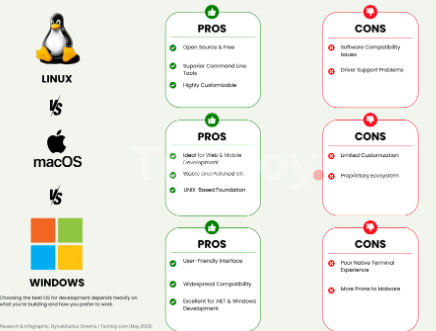
File management is a critical aspect of everyday computing, influencing productivity and user experience. When it comes to operating systems, Windows, macOS, and Linux each offer unique file management systems tailored to their users’ needs. This post will compare these three systems and provide insights into their functionalities and best practices.
1. File System Structure
Windows employs the NTFS (New Technology File System) as its primary file system. NTFS includes features like permissions, encryption, and support for larger file sizes compared to older systems like FAT32. It organizes files in a hierarchical manner, utilizing directories and subdirectories that help users categorize their data effectively. With its familiar interface, navigating through folders feels intuitive for many users, especially those who have stuck with Windows for years.
On the other hand, macOS uses a file system known as APFS (Apple File System), which is optimized for SSDs and offers benefits like space efficiency and data integrity. The macOS Finder allows users to drag and drop files seamlessly between different locations, making it user-friendly and efficient. Mac also emphasizes organization through tags and smart folders, enabling users to categorize files in a more dynamic way, enhancing the overall file organization experience.
-
- Familiarize yourself with the default file systems: NTFS for Windows and APFS for macOS.
-
- Understand the folder structure to simplify navigation and organization.
-
- Use directories effectively in Windows to minimize file clutter.
-
- Leverage tags and smart folders in macOS for dynamic organization.
2. File Management Tools and Features
Windows provides a robust File Explorer, allowing users to manage files effortlessly. Some standout features of File Explorer include Quick Access, which shows frequently used folders, and the Ribbon interface for easy access to commands like Copy, Paste, and Delete. Additionally, Windows incorporates a search function that enables users to find files quickly using keywords or file types. This can be especially beneficial when dealing with a large volume of data.
macOS boasts the Finder application, known for its streamlined design and feature-rich environment. Users can access applications, documents, and even external drives with a single click. A unique capability of Finder is the ability to create workflows with Automator, allowing users to automate repetitive tasks, such as resizing images or moving files from one folder to another. This not only saves time but also enhances workflow efficiency, particularly for users engaged in multimedia editing or large-scale data management.
-
- Utilize Quick Access in Windows for easy navigation to frequently used folders.
-
- Employ the search function in File Explorer to find files effortlessly.
-
- Explore Automator on macOS for task automation and increased productivity.
-
- Keep your file management tools updated for improved efficiency and security.
3. Cross-Platform Compatibility and Integration
One notable advantage of Windows is its wide-ranging compatibility with third-party applications. This flexibility allows users to integrate popular file management tools, such as Dropbox, Google Drive, and OneDrive, enhancing functionality and cloud storage options. Users can easily sync files across devices, making it convenient to access important documents regardless of the operating system being used.
In contrast, Linux offers a different set of advantages, particularly in open-source applications. While Linux may not have the same level of support for proprietary software as Windows, it excels in customization and flexibility. Tools like Nautilus and Dolphin—file managers within different Linux distributions—come equipped with unique capabilities. They allow users to manage files while also enabling scripts that automate tasks, enhancing their overall productivity on Linux.
-
- Consider using cloud storage solutions for seamless file sharing across platforms.
-
- Familiarize yourself with Linux file managers to exploit their features fully.
-
- Take advantage of Windows’ compatibility with various application integrations.
-
- Explore customization options in Linux for a personalized file management experience.
In conclusion, whether you prefer Windows, macOS, or Linux, each operating system offers its file management strategies, tools, and features. Understanding these differences can enhance your productivity and optimize your file organization methods. Experiment with the options available in your OS to find the best fit for your workflow.