
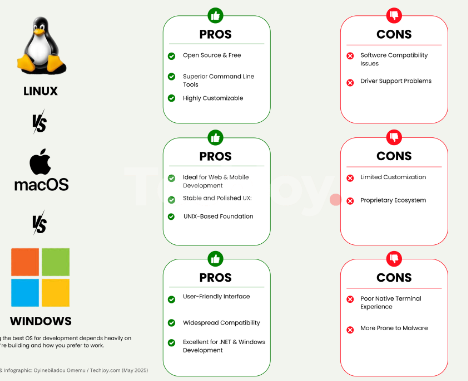
As technology becomes increasingly intertwined with our lives, understanding how various operating systems handle privacy is essential. Windows, macOS, and Linux each have unique approaches to privacy, affecting how they collect, store, and utilize user data. This blog post will delve into the privacy differences of these systems, providing insights to help users make informed choices.
1. Windows Privacy Features
Windows has made strides in improving user privacy, particularly with its latest iterations like Windows 10 and 11. Users need to be aware, however, that Microsoft collects various types of data, including diagnostic data, usage statistics, and even location data. While these features are designed to improve user experience, many find them intrusive, as users might feel they are being watched without consent.
To enhance your privacy on Windows, you can adjust your privacy settings through the Control Panel, limiting what data is shared. Windows also offers a feature called “Privacy Dashboard,” where users can manage their data collection preferences in more detail. However, many users may still feel uneasy about the default data collection practices, prompting some to consider alternative systems.
-
- Review your privacy settings immediately after installation.
-
- Turn off location tracking if not needed.
-
- Limit diagnostic data sharing to the bare minimum.
-
- Consider using Windows Defender for added security.
-
- Regularly check for Windows updates to patch vulnerabilities.
2. macOS Privacy Practices
Apple’s macOS is often praised for its strong stance on user privacy. The company emphasizes encryption and data minimization, which limits the amount of data collected. Features like “Sign in with Apple,” which allows users to hide their email addresses while still allowing app access, demonstrate a commitment to privacy protection. Moreover, Apple’s App Store review process ensures that applications comply with certain privacy standards.
However, it is crucial for users to be proactive in configuring their privacy settings. By visiting the System Preferences menu, you can manage app permissions, control location services, and decide what diagnostic information is shared. While macOS typically provides a more privacy-centered experience, users need to understand the nuances to maximize their security.
-
- Regularly audit app permissions through System Preferences.
-
- Enable FileVault for full disk encryption.
-
- Adjust Safari settings to block tracking cookies.
-
- Use “Sign in with Apple” to limit email sharing.
-
- Stay updated with the latest macOS versions for security improvements.
3. Linux and User Control
Linux offers unparalleled privacy controls compared to Windows and macOS. As an open-source operating system, Linux allows users to inspect the source code, empowering them to understand precisely what their system is doing. Distributions like Ubuntu and Fedora even emphasize user privacy as a core feature, appealing to privacy advocates. In Linux, users have the ability to selectively install software, which reduces instances of unseen data collection.
One of the biggest advantages of Linux is its community-driven focus on security and privacy. Users can choose distributions that come pre-installed with privacy-enhancing features, like Tails which routes connections through the Tor network. However, this level of customization may require some technical know-how, making it less user-friendly for the average user.
-
- Choose a privacy-focused Linux distribution for better default settings.
-
- Regularly update your system and applications.
-
- Familiarize yourself with terminal commands for advanced configurations.
-
- Utilize VPN services for enhanced online privacy.
-
- Engage with the Linux community for tips and best practices.
In conclusion, understanding the privacy differences between Windows, macOS, and Linux can help users make informed decisions to protect their personal data. Each operating system has its strengths and weaknesses, so it’s essential to assess your needs and choose accordingly. Whether you stick with your current system or explore alternatives, taking control of your privacy is a vital step in today’s digital landscape.